All the Operating System Concepts You Need to Know.
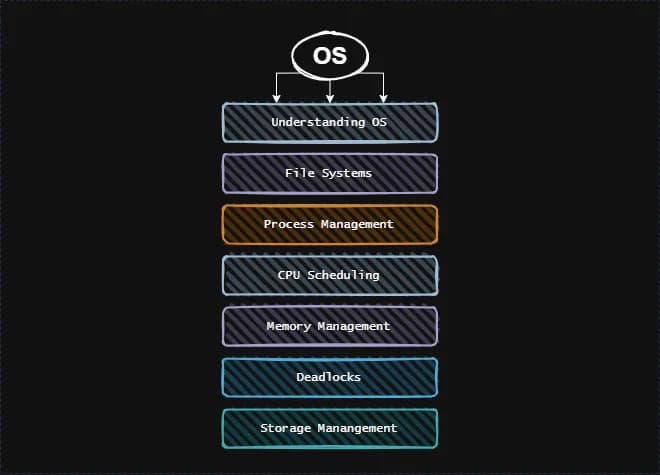
What is an Operating System?
An Operating System (OS) is system software that manages computer hardware and software resources, providing common services for computer programs. It acts as an intermediary between users and hardware, enabling applications to access hardware resources efficiently.
Key Roles of an OS
- Process Management — Handles the execution of processes, including scheduling and multitasking.
- Memory Management — Allocates and deallocates memory to processes as required.
- File System Management — Organizes, stores, and retrieves files efficiently.
- Device Management — Controls hardware devices and ensures smooth communication between software and hardware.
- Security and Access Control — Manages user authentication, authorization, and data protection.
Types of Operating Systems
1. Batch OS
Executes batches of jobs without user interaction.
- Advantages: Efficient use of resources, reduced idle time.
- Disadvantages: Difficult to estimate job completion time; job failure can delay others.
2. Multiprogramming OS
Multiple programs reside in memory; CPU switches between them.
- Advantages: Maximizes CPU utilization, minimizes idle time.
- Disadvantages: Complex implementation, CPU overhead for switching tasks.
3. Multiprocessing OS
Uses multiple CPUs to execute tasks concurrently.
- Advantages: Increased throughput, reliability, and performance.
- Disadvantages: Expensive and complex to manage.
4. Time-Sharing OS
Assigns a fixed time quantum to each task, ensuring fairness.
- Advantages: Quick response times, equal opportunity for tasks.
- Disadvantages: Complex to manage, potential security concerns.
5. Real-Time OS (RTOS)
Executes tasks within strict time constraints. Used in time-critical applications.
- Advantages: High reliability, precise task execution.
- Disadvantages: Expensive, consumes significant system resources.
6. Multitasking OS
An extension of multiprogramming with round-robin scheduling.
7. Distributed OS
Multiple computers are interconnected via a network to share resources.
- Advantages: Resource sharing, system independence.
- Disadvantages: Expensive and complex to manage.
OS Components
Kernel
The core of the OS, responsible for managing hardware and system resources. Operates in Kernel Mode (privileged mode) while most user applications run in User Mode (restricted mode).
Types of Kernels:
- Monolithic Kernel — All core OS services run in kernel space (e.g., Linux).
- Microkernel — Only essential services run in kernel space; other services run in user space (e.g., QNX, MINIX).
- Hybrid Kernel — A mix of monolithic and microkernel architectures (e.g., Windows NT).
- Exokernel — Exposes hardware resources directly to applications for high performance (e.g., Exokernel).
Kernel Architecture:
- Layered Architecture — OS is divided into layers, each providing services to the next.
- Modular Kernel — Features can be added or removed dynamically via Loadable Kernel Modules (LKMs), as seen in Linux.
Kernel Space vs. User Space:
- Kernel Space — Direct access to hardware, operates at a high privilege level.
- User Space — Restricted memory where applications run to prevent interference with system resources.
Kernel Data Structures:
- Process Control Block (PCB): Stores process state, process ID, registers, etc.
- Page Tables: Maps virtual memory to physical memory.
- Device Tables: Stores information about connected devices.
System Calls
System calls serve as an interface between User Space and Kernel Space. They allow applications to request services from the OS.
Examples:
fork()– Creates a new process.read()– Reads data from a file.write()– Writes data to a file.close()– Closes a file descriptor.
Shell
A shell is a command-line interpreter that allows users to interact with the OS. It executes commands and communicates with the kernel.
Types of Shells:
- Bourne Shell (sh): First Unix shell, efficient for scripting.
- Bourne Again Shell (bash): Default Linux shell, backward-compatible with sh.
- C Shell (csh): C-like syntax, supports command history.
- Z Shell (zsh): Advanced features like spelling correction and shared command history.
Shell Features:
- Scripting: Automates tasks via shell scripts.
- Job Control: Manages multiple processes (fg, bg, kill).
- Environment Variables: Stores shell configuration settings.
Shell Scripting
Shell scripting is used to automate repetitive tasks. Scripts are written in shell languages (e.g., Bash) and executed using the shell interpreter.
Basic Shell Script Example:
#!/bin/bash
echo "Hello, World!"
To execute:
chmod +x script.sh
./script.sh
Shell scripts can include variables, loops, conditions, and functions to enhance automation.
Key Components of an OS
1. Bootloader
- Loads the OS into memory during system startup.
- Resides in the boot sector of the hard drive.
2. Init System
- The first process started by the kernel.
- Manages other processes during startup.
- Examples: System V init, Upstart, systemd.
3. File System
- Organizes and stores files on storage devices.
- Examples: ext4, NTFS, FAT32.
4. Processes
- An executing instance of a program.
- Each process has a unique Process ID (PID) and a Parent Process ID (PPID).
- Process States: New, Ready, Running, Waiting, Terminated.
5. System Calls
Provide an interface between user applications and the OS kernel.
File Systems
A structured way to store and manage files. Acts as an interface between the OS and the storage device.
Types of File Systems
- FAT (File Allocation Table): Used in older Windows systems. Simple and easy to implement, but lacks features like journaling and permissions.
- NTFS (New Technology File System): Used in modern Windows systems. Supports large file sizes, file permissions, journaling, compression and encryption.
- ext4: Used in Linux systems. Also supports large file sizes, journaling, and file permissions.
- HFS+ (Hierarchical File System) / APFS (Apple File System): Used in macOS systems. Supports journaling, encryption, and file permissions.
File System Components
In Linux, the file system organizes files and directories into a hierarchical structure.
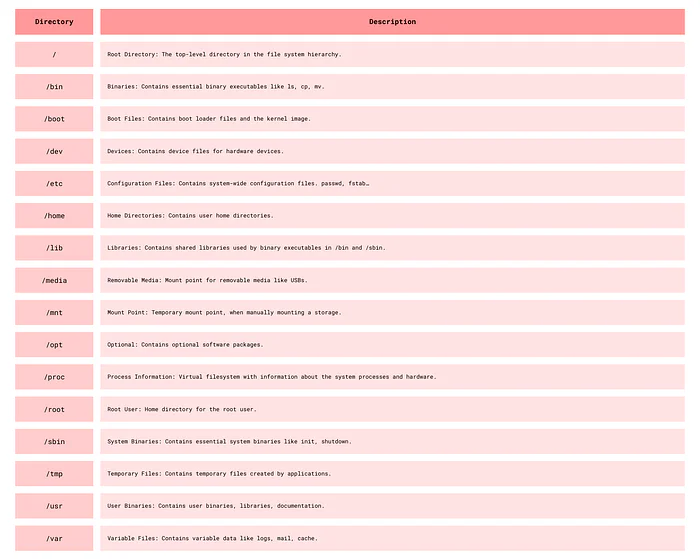
Linux system directories.
File and Directory Permissions
In Linux, file permissions define who can read, write or execute a file.
Each file and directory has 3 permissions for groups:
- User (u): The owner
- Group (g): Group members that share access
- Others (o): All other users
Permissions are represented by 3 characters:
r: Read, represented by 4w: Write, represented by 2x: Execute, represented by 1
Permissions are represented by 3 sets of characters:
rwxrw-r--is divided into 3 sets:rwxfor owner,rw-for group,r--for othersrwxrw-r--is 764 in octal representationrwxcan be represented by 4 + 2 + 1 = 7
Commands for File and Permission Manipulation
Basic File Commands
ls — List files and directories.
ls -l   # Long listing format
ls -a   # List all files including hidden files
ls -lh  # Human-readable file sizes
touch — Create an empty file.
touch file.txt
touch file1.txt file2.txt
cat — Concatenate and display file content.
cat file.txt
cat file1.txt file2.txt
cat > file.txt    # Create a file and write content
cat >> file.txt   # Append content to a file
cat file.txt | less   # Display file content page by page
cp — Copy files and directories.
cp file.txt newfile.txt
cp -r dir1 dir2   # Copy directories recursively
mv — Move or rename files and directories.
mv file.txt newfile.txt
mv file.txt dir/   # Move file to a directory
rm — Remove files and directories.
rm file.txt
rm -r dir/   # Remove directories recursively
Viewing and Modifying Permissions
chmod — Change file or directory permissions.
- Numeric Mode:
chmod 755 file.txt→rwxr-xr-x - Symbolic Mode:
chmod u+r file.txt→ Adds read permission for the owner
Symbolic Mode Syntax:
u→ User,g→ Group,o→ Others,a→ All+→ Add permission,-→ Remove permission,=→ Set permission
chmod u+x file.txt   # Add execute permission for the owner
chmod g-w file.txt   # Remove write permission for the group
chmod o=r file.txt   # Set read permission for others
chmod 755 file.txt   # Set permissions using numeric mode
Ownership Management
chown — Change file or directory owner.
chown user:group file.txt   # Change owner and group
chown user file.txt   # Change owner
chown :group file.txt   # Change group
chgrp — Change file or directory group.
chgrp group file.txt   # Change group
chgrp :group file.txt   # Change group
umask — Sets the default file permissions when a file is created. umask is responsible for setting its permissions.
umask 022: sets default permissions to 755 for directories and 644 for files.
How to read umask?
umask 022→777 - 022 = 755for directories (777 is the default permission for directories)umask 022→666 - 022 = 644for files (666 is the default permission for files)
If the umask is set to 022, the default permissions for files will be 644 and for directories will be 755, which is the default in most systems.
stat — Displays detailed information about a file, including its permissions.
stat file.txt
stat -c %a file.txt   # Display only the permissions
What is a Process?
A process is a program in execution, it is active and has a lifecycle.
A process's representation in memory consists of:
- Text Section: The program's code, also includes the program counter.
- Data Section: Contains global and static variables.
- Heap Section: Contains dynamically allocated memory.
- Stack Section: Contains function calls and local variables.
Process States
A process can be in one of the following states:
- New: The process is being created.
- Ready: The process is waiting to be assigned to a processor.
- Running: Instructions are being executed.
- Waiting: The process is waiting for some event to occur.
- Terminated: The process has finished execution.
- Suspended: Temporarily moved to the secondary storage to make space for other processes.
Process Transitions:
- Ready → Running: Scheduled for execution
- Running → Ready: Time slice ended, process preempted
- Running → Blocked: Waiting for resources like I/O
- Blocked → Ready: Resources available
- Running → Terminated: Process finished execution
- Blocked → Terminated: Process aborted
Types of Processes
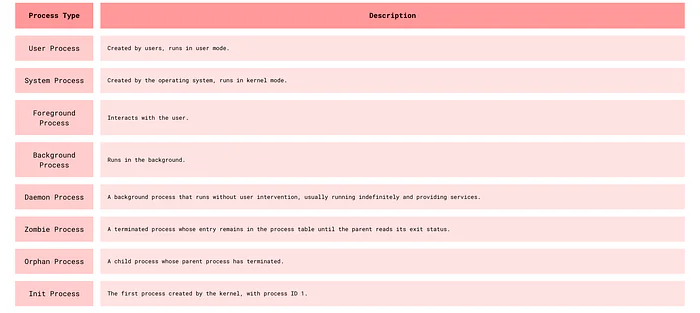
Different Types of Processes
Process Control Block (PCB)
The PCB is a data structure that contains information about the process:
- Process ID: Unique identifier
- Process State: Current state of the process
- Program Counter: Address of the next instruction
- CPU Registers: Contents of the registers
- CPU Scheduling Information: Priority, time limits
- Memory Management Information: Memory limits, page tables
- Accounting Information: CPU used, time limits
- I/O Status Information: Open files, devices
Functions of PCB:
- Helps in context switching.
- Helps in process scheduling.
- Helps in process synchronization.
Process Operations
Process Creation — Act of creating a new process, usually done by the fork() system call.
Scheduling — The process scheduler selects a process from the ready queue to run on the CPU.
Execution — The process is executed by the CPU. It can be in the running, ready, or blocked state.
Process Termination — The process finishes execution and is removed from the system.
CPU-Bound vs I/O Bound Processes
- CPU-Bound Process: Requires a lot of CPU time, spends more time in the running state.
- I/O-Bound Process: Requires a lot of I/O operations, spends more time in the waiting state.
- Process mix: Combination of CPU-bound and I/O-bound processes.
Process Scheduling and Scheduling Algorithms
Our goal is to maximize CPU utilization and throughput, minimize turnaround time, waiting time, and response time.
Schedulers
- Long-term Scheduler: Selects processes from the job queue and loads them into memory, i.e., brings into the ready queue. Controls the degree of multiprogramming.
- Short-term Scheduler: Selects processes from the ready queue and assigns them to the CPU, i.e., selects the next process to run. (Also called CPU scheduler)
- Medium-term Scheduler: Swaps processes in and out of memory. It decreases the degree of multiprogramming.
Scheduling Algorithms
- First-Come, First-Served (FCFS): Schedules according to arrival time.
- Shortest Job Next (SJN): Schedules according to burst time.
- Priority Scheduling: Schedules according to priority.
- Round Robin (RR): Schedules according to time slice.
- Multilevel Queue Scheduling: Schedules according to multiple queues.
- Multilevel Feedback Queue Scheduling: Schedules according to multiple queues with feedback.
Context Switching
The process of saving the state of the current process and loading the state of another process.
Steps:
- Save the state of the current process.
- Update the PCB of the current process.
- Move the PCB of the current process to the appropriate queue.
- Select the next process to run.
- Load the state of the next process.
- Update the PCB of the next process.
Interprocess Communication (IPC)
To enable processes to communicate and synchronize.
Processes are of 2 types:
- Independent Processes: Do not share memory.
- Cooperating Processes: Share memory.
IPC is generally for cooperating processes since they share memory and can be affected by other processes.
Done through:
- Shared Memory: Processes share a portion of memory.
- Message Passing: Processes exchange messages.
IPC Synchronization Mechanisms:
- Mutexes: Lock-based mechanism for exclusive resource access
- Semaphores: Signaling mechanism to control access to shared resources
- Pipe: Unidirectional or bidirectional communication channel
Threads
A thread is a single sequence stream within a process. It shares the process's resources but has its own program counter, stack, and set of registers.
Why do we need threads?
- They run in parallel and improve performance.
- They share resources and communicate efficiently without IPC.
- They are lightweight and have low overhead and have their own Thread Control Block (TCB).
Components of a Thread
- Program Counter: Contains the address of the next instruction.
- Registers: Used for arithmetic operations.
- Stack Space: Contains local variables and function calls.
- Thread ID: Unique identifier.
- Thread State: Running, ready, blocked.
- Thread Priority: Determines the order of execution.
Thread States
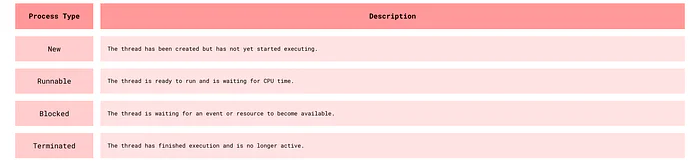
Thread States
Types of Threads
- User-Level Threads: Managed by the application.
- Kernel-Level Threads: Managed by the OS.
Differences Between User Level Threads and Kernel Level Threads
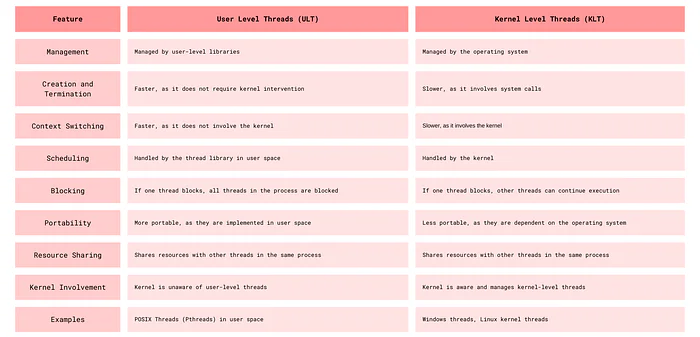
ULT vs KLT
What is Multi-threading?
Multi-threading is a programming and execution model that allows multiple threads to exist within the context of a single process. These threads share the process's resources but execute independently. Multi-threading is used to improve the performance of applications by allowing concurrent execution of tasks, which can lead to better resource utilization and responsiveness.
Key benefits of multi-threading include:
- Parallelism: Threads can run in parallel on multi-core processors, leading to faster execution of tasks.
- Responsiveness: Applications remain responsive by performing time-consuming operations in the background.
- Resource Sharing: Threads within the same process share memory and resources, facilitating efficient communication and data exchange.
- Scalability: Multi-threaded applications can scale better with increasing workloads and hardware capabilities.
Why is Multi-Threading faster?
While the computer system's processor only carries out one instruction at a time when multithreading is used, various threads from several applications are carried out so quickly that it appears as though the programs are running simultaneously.
Thread vs Process
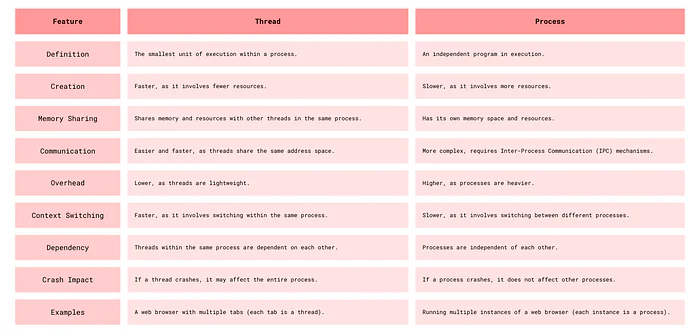
Threads vs Process
Race Condition
In a multi-threaded environment, threads often share resources such as variables, data structures, or files. When multiple threads try to read and write to these shared resources without proper synchronization, a race condition can occur. The threads "race" to access the resource, and the final state of the resource depends on the timing of their execution, which can vary each time the program runs.
Example of a Race Condition in Java
public class BankAccount {
    private int balance = 0; // Shared balance variable

    public void deposit(int amount) {
        int newBalance = balance + amount; // Step 1: Read balance
        balance = newBalance;              // Step 2: Update balance
    }

    public int getBalance() {
        return balance;
    }

    public static void main(String[] args) {
        BankAccount account = new BankAccount();

        Thread person1 = new Thread(() -> {
            for (int i = 0; i < 1000; i++) {
                account.deposit(1); // Each deposit increases balance by 1
            }
        });

        Thread person2 = new Thread(() -> {
            for (int i = 0; i < 1000; i++) {
                account.deposit(1);
            }
        });

        person1.start();
        person2.start();

        try {
            person1.join();
            person2.join();
        } catch (InterruptedException e) {
            e.printStackTrace();
        }

        System.out.println("Final Account Balance: " + account.getBalance());
    }
}
In this example, we simulate a race condition with two threads (person1 and person2) that deposit money into a shared bank account. Each thread deposits 1 unit of money 1000 times, so we expect the final balance to be 2000. However, due to the lack of synchronization, the deposit() method allows both threads to read and write to balance simultaneously, leading to incorrect final results on a few instances.
Why It's a Race Condition
The deposit() method is not synchronized, so both threads can read the balance variable at the same time. If both threads read the balance simultaneously, they may calculate and write back the same newBalance, resulting in missed increments and an incorrect final balance.
Solution: Synchronize Access to balance
To fix this, we can add synchronization to ensure that only one thread can execute the deposit() method at a time, making the updates to balance thread-safe.
This can be done by adding synchronized to the deposit() method, or by using a ReentrantLock to control access to the shared resource, or by using atomic operations like AtomicInteger.
Locks — Mutex and Critical Section
Mutex (Mutual Exclusion):
- A mutex is a synchronization primitive that ensures exclusive access to a shared resource.
- Only one thread can hold the mutex at a time, preventing other threads from accessing the resource simultaneously.
Critical Section:
- A critical section is a part of the code that accesses shared resources and must not be executed by more than one thread at a time.
- By using a mutex, we can protect the critical section, ensuring that only one thread can execute it at a time.
Example in Java:
public class BankAccount {
    private int balance = 0;
    private final Object lock = new Object(); // Mutex

    public void deposit(int amount) {
        synchronized (lock) { // Critical section
            balance += amount;
        }
    }

    public int getBalance() {
        return balance;
    }
}
In this example, the synchronized block ensures that only one thread can execute the deposit method at a time, protecting the critical section and preventing race conditions.
CPU Scheduling
Objective
The primary goal of CPU scheduling is to maximize CPU utilization and throughput while minimizing response time, turnaround time, and waiting time.
Key Tasks
- Select a process from the ready queue and allocate the CPU to it.
- Balance system responsiveness and efficiency.
- Ensure fairness and prevent starvation (where a process is indefinitely delayed).
Scheduling Criteria
- CPU Utilization: Keep the CPU busy as much as possible.
- Throughput: The number of processes that complete their execution per time unit.
- Turnaround Time: The total time taken to complete a process, from submission to termination.
- Waiting Time: The total time a process spends waiting in the ready queue.
- Response Time: The time taken to respond to a request (time until the first response is produced).
Scheduling Metrics and Formulas
- CPU Utilization:
Utilization = 1 - (Idle Time / Total Time) - Throughput:
Throughput = Number of processes / Total Time - Average Waiting Time:
Waiting Time = Total Waiting Time / Number of Processes - Average Completion Time:
Completion Time = Total Completion Time / Number of Processes - Turnaround Time:
Turnaround Time = Completion Time - Arrival Time - Waiting Time:
Waiting Time = Turnaround Time - Burst Time - Response Time:
Response Time = Time of first response - Arrival Time
Common Scheduling Strategies
- Assign a task to the CPU when it becomes available.
- Preempt (interrupt) a task if a higher-priority task arrives.
- Preempt a task if it exceeds its allocated time quantum.
- Preempt a task if it blocks (e.g., waiting for I/O).
Strategies for prioritizing jobs may include:
- Assign simple or short-duration tasks first.
- Prioritize complex tasks first.
Scheduling Algorithms
First-Come, First-Served (FCFS)
Processes are scheduled in the order they arrive.
- Pros: Simple to implement.
- Cons: Can lead to the "convoy effect" (short processes stuck behind long ones).
Shortest Job First (SJF)
The process with the smallest execution time (burst time) is selected first.
- Pros: Minimizes average waiting time.
- Cons: Requires knowing burst times in advance; prone to starvation of long processes.
Preemptive SJF / Shortest Remaining Time First (SRTF)
The current process can be preempted if a new process arrives with a shorter remaining burst time.
- Pros: Better responsiveness and average waiting time compared to non-preemptive SJF.
- Cons: Increases overhead due to context switching.
Priority Scheduling
Each process is assigned a priority. The process with the highest priority is selected first.
- Cons: Risk of starvation for low-priority processes.
Priority Inversion & Priority Inheritance
- Priority Inversion: A high-priority process is blocked waiting for a lower-priority process holding a resource, and the lower-priority process is preempted by a medium-priority one.
- Priority Inheritance (Solution): Temporarily raise the priority of the lower-priority process holding the resource to match the waiting high-priority process.
Round Robin (RR)
Each process is assigned a fixed time slice (time quantum). If a process doesn't complete within its quantum, it's preempted and moved to the back of the queue.
- Pros: Fair; prevents starvation.
- Cons: Too small a quantum increases context switching overhead; too large a quantum approaches FCFS behavior.
Multilevel Queue Scheduling
Processes are divided into multiple queues based on type or priority (e.g., system, interactive, batch). Each queue has its own scheduling algorithm. Queues are scheduled in a priority order.
Multilevel Feedback Queue Scheduling
Addresses issues with Multilevel Queue: Solves the issue of knowing which queue to add a process to. Adapts if a task changes behavior. Prevents starvation. Differentiates between CPU-bound and I/O-bound tasks.
Modern CPU Scheduling Techniques
O(1) Linux Scheduler (Older)
Designed to select the next process to run in O(1) constant time.
- Issues: Not fair to lower-priority tasks; difficult for interactive tasks.
Completely Fair Scheduler (CFS) (Current Linux Scheduler)
- Proportional Share Scheduling: Each process gets CPU time proportional to its weight (priority).
- Virtual Runtime (vruntime): Tracks CPU time a process should have received.
- Red-Black Tree: Processes are stored in a balanced red-black tree.
- Algorithm: Select leftmost node (lowest vruntime); update vruntime; rebalance tree.
- Issues: Higher overhead due to red-black tree operations (O(log n)).
Multi-Core & Multi-CPU Scheduling
Scheduling Challenges
- Load Balancing: Evenly distribute workload across cores.
- Process Affinity: Keep processes on the same core to benefit from cache locality.
- Contention Management: Minimize bottlenecks from processes competing for shared resources.
Scheduling Strategies
- Global Scheduling: Single runqueue for all CPUs.
- Per-Core Scheduling: Each core has its own runqueue.
- Hybrid Scheduling: Combines global and per-core.
Processor Affinity
- Soft Affinity: Scheduler prefers to keep processes on the same core.
- Hard Affinity: Processes are strictly bound to specific cores.
Simultaneous Multithreading (SMT) & Hyper-Threading
- SMT: Enables a single core to execute multiple threads by sharing execution units.
- Hyper-Threading (HT): Intel's implementation of SMT.
- Performance Optimization: Use hyper-threading if idle time exceeds 2x context switch time. Optimize based on IPC (Instructions Per Cycle).
NUMA (Non-Uniform Memory Access) & RAM Affinity
- NUMA: System architecture with multiple memory nodes linked to specific CPUs.
- Scheduler tries to keep tasks on CPUs closer to their frequently used memory.
- NUMA-Aware Scheduling: Scheduler considers memory locality.
How to Identify CPU-Bound vs. Memory-Bound Tasks
- Historical Data: Analyze previous execution patterns.
- Metrics Like Sleep Time: CPU-bound: Minimal sleep time. Memory-bound: Longer waiting periods.
- Performance Observations: Tasks taking too long to compute → CPU-bound. Tasks stalling due to data fetching → Memory-bound.
- Hardware Counters: Cache Misses (L1, L2, LLC): High misses indicate memory-bound tasks. IPC (Instructions Per Cycle): Low IPC often signals memory-bound tasks.
Memory Management
Memory management is a critical function of operating systems that ensures efficient utilization of a computer's memory resources. It's the process by which the OS handles the complex memory hierarchy to allocate space to processes and optimize overall system performance.
Why Memory Management Matters
- Maximizes memory utilization: Makes the most of available physical memory
- Supports multitasking: Enables multiple processes to run simultaneously by dynamically allocating memory
- Ensures memory protection: Prevents processes from accessing each other's memory space
- Optimizes performance: Reduces latency and improves throughput
The OS's Role in Memory Management
The operating system performs numerous memory-related tasks:
- Memory allocation and deallocation
- Memory protection
- Memory sharing
- Memory swapping
- Memory mapping
- Fragmentation management
- Performance optimization
Understanding Address Spaces
Logical vs Physical Addresses
- Logical (virtual) addresses: Generated by the CPU during program execution
- Physical addresses: Actual locations in physical memory
The Memory Management Unit (MMU) is responsible for translating logical addresses to physical addresses.
Address Binding
Address binding is the process of mapping logical addresses to physical addresses. This can occur at three different times:
- Compile-time binding: Addresses are fixed during compilation
- Load-time binding: Addresses are determined when the program is loaded into memory
- Execution-time binding: Addresses are determined during program execution (requires MMU support)
Memory Allocation Strategies
Contiguous Memory Allocation
- Single Partition Allocation: The entire memory (except OS space) is allocated to a single process. Simple but doesn't support multitasking.
- Multiple Partition Allocation: Memory divided into multiple partitions (fixed or variable size). Fixed-size partitions can lead to internal fragmentation. Variable-size partitions can cause external fragmentation.
Non-Contiguous Memory Allocation
- Segmentation: Divides memory into logical segments (code, data, stack, heap). Each segment has a base address and limit (size). Can still lead to external fragmentation.
- Paging: Divides memory into fixed-size blocks: pages (logical) and frames (physical). Pages map to frames via a page table. Eliminates external fragmentation but may introduce internal fragmentation.
Deep Dive: Paging
Key Components
- Page: Fixed-size block of logical memory
- Frame: Fixed-size block of physical memory
- Page Table: Maps logical pages to physical frames
- Page Table Base Register (PTBR): Points to the page table
- Page Table Length Register (PTLR): Indicates the page table size
How Paging Works
Logical address is divided into page number and offset. Page number indexes the page table to find the frame number. Frame number combines with offset to form the physical address.
Page Table Variations
- Flat Page Table: Simple single-level table (inefficient for large address spaces)
- Hierarchical Page Table: Multi-level structure reducing memory overhead
- Inverted Page Table: Maps physical frames to logical pages
- Hashed Page Table: Uses hash functions for mapping
Deep Dive: Segmentation
Key Components
- Segment Table: Stores base address and size for each segment
- Segment Offset: Specifies location within a segment
How Segmentation Works
Memory is divided into variable-sized segments based on logical program structure, with segment number and offset stored in the segment table.
Paging vs. Segmentation
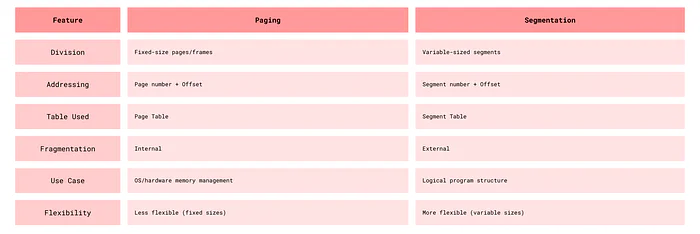
Paging vs Segmentation
Virtual Memory
Virtual memory creates the illusion of a larger memory space by combining physical memory (RAM) and disk space. It enables running programs larger than available physical memory.
Benefits
- Supports programs larger than physical memory
- Improves multitasking through memory isolation
- Enhances performance with reduced physical requirements
Demand Paging
Pages load into memory only when needed. If a program accesses a page not in memory, a page fault occurs:
- OS pauses the process
- Required page loads from disk to memory
- Page table updates
- Process resumes
Page Replacement Algorithms
When memory is full, the OS must decide which page to replace:
- FIFO (First-In-First-Out): Replaces oldest loaded page. Simple but can lead to Belady's Anomaly.
- LRU (Least Recently Used): Replaces least recently accessed page. Effective but requires usage tracking.
- LFU (Least Frequently Used): Replaces least frequently used page.
- Optimal: Replaces page not needed for longest future time. Theoretical best but requires future knowledge.
- Clock: Uses a circular buffer with usage bits.
Thrashing
Thrashing occurs when the system spends more time handling page faults than executing processes. Causes include: insufficient memory, poor page replacement algorithms, excessive multitasking.
Working Set Model
The working set model tracks pages actively used by a process over a time window to ensure sufficient memory allocation and prevent thrashing.
Memory Allocation Strategies
- First Fit: Allocates first available block that's large enough. Fast but can create small unusable gaps.
- Best Fit: Allocates smallest sufficient block. Reduces internal fragmentation but requires full search.
- Worst Fit: Allocates largest available block. Leaves larger free blocks but may increase fragmentation.
Advanced Memory Management Techniques
Memory Pools
Pre-allocated memory blocks reserved for specific object types. OS maintains pools of free memory blocks. Allocation from pool is faster than general allocation. Freed memory returns to the pool.
Swapping
Temporarily moves processes between RAM and disk. OS selects idle or low-priority processes. Process state saves to disk. Memory frees for other processes. Process reloads when needed.
Spooling
Spooling (Simultaneous Peripheral Operations On-Line) holds data temporarily for devices. Data goes to a buffer until the device is ready. Device processes data at its own pace. CPU continues other tasks meanwhile.
Memory Fragmentation
Internal Fragmentation
Occurs when allocated memory exceeds process needs. Common with fixed-size allocation. Wasted space within allocated blocks. Solutions: smaller block sizes or dynamic partitioning.
External Fragmentation
Occurs when free memory is scattered in small blocks. Total free memory is sufficient but not contiguous. Solutions: compaction or non-contiguous allocation.
Memory Compaction
Rearranges memory to consolidate free space. OS moves allocated blocks together. Creates larger contiguous free blocks. Time-consuming but reduces fragmentation.
Performance Optimization
TLB (Translation Lookaside Buffer)
A small, fast cache for address translations:
- Stores recent logical-to-physical address mappings
- TLB hit: mapping found in cache (fast)
- TLB miss: requires page table lookup (slower)
- ~100 times faster than RAM lookup
Performance Metrics
Page Fault Rate = Number of Page Faults / Number of Memory AccessesTLB hit access time = TLB lookup timeTLB miss access time = TLB lookup time + Page Table access timeEffective Access Time = H × (TLB hit time) + (1-H) × (TLB miss time)where H is the hit ratio
Kernel Memory Management
Slab Allocation
Manages memory for same-sized objects. Memory divided into slabs (collections of fixed-size blocks). Objects pre-allocated for quick retrieval. Reduces fragmentation and ensures alignment.
Buddy System
Divides memory into power-of-2 sized blocks. Kernel maintains free block lists (1KB, 2KB, 4KB, etc.). Allocates smallest sufficient block. Tracks "buddy" blocks for merging when freed. Fast allocation with reduced external fragmentation.
Advanced Techniques
Copy-on-Write (COW)
Optimizes memory when processes fork. Parent and child initially share same physical pages. Memory marked as read-only. Copy created only when a process attempts to write. Reduces memory usage and speeds process creation.
NUMA (Non-Uniform Memory Access)
Architecture for multi-processor systems. System divided into nodes (processor + memory). Access time varies based on memory location. Local memory access faster than remote.
Memory-Mapped Files
Maps files directly to memory. File appears as part of address space. Enables file access via memory operations. Simplifies file I/O.
Common Memory Issues
Memory Leaks
Occurs when programs fail to release allocated memory. Causes gradual memory depletion. Results from improper memory management. Requires careful tracking and deallocation.
Checkpointing
Saves system or process state to disk. Enables recovery after failures. Provides system restore points. Important for critical applications.
Deadlock
A deadlock occurs when a set of processes are blocked because each process is waiting for a resource that another process is holding.
Conditions for Deadlock
All these conditions must be true for a deadlock to occur!
- Mutual Exclusion: At least one resource must be held in a non-sharable mode. (only one process can use the resource at a time)
- Hold and Wait: A process is holding at least one resource and waiting to acquire additional resources held by others.
- No Preemption: Resources cannot be forcibly taken from a process, the process must release them on its own.
- Circular Wait: A set of processes are waiting in such a order that a circular chain is formed. Kind of like a cycle.
Real Life Example
I am stuck in a traffic at a 4-way intersection. I am waiting for the car in front of me to move, but the car in front of me is waiting for the car to its right to move, and that car is waiting for me to move. This is a deadlock. I am stuck in a deadlock!
Deadlock Modeling
Resource Allocation Graph: A directed graph that shows the relationship between processes and resources.
General Convention for RAGs:
- A circle represents a process. A square represents a resource.
- Allocation Edge (R -> P), Request Edge (P -> R)
- If there is a single resource instance, a cycle in the graph always indicates a deadlock.
- If there are multiple resource instances, cycles may not imply a deadlock.
Deadlock Prevention
Our goal is to prevent at least one of the four conditions from occurring.
- Breaking Mutual Exclusion: Use spooling or make resources sharable where possible.
- Breaking Hold and Wait: Require processes to request all resources at once. But this may lead to resource wastage / under utilization.
- Breaking No Preemption: Allow OS to preempt resources and reassign them to others. For eg, Preempting CPU cycles from a low-priority process to a high-priority process.
- Breaking Circular Wait: Assign a unique number to each resource and require that processes request resources in increasing order.
Deadlock Avoidance
Here our goal is to ensure the system never enters an unsafe state.
- Safe State: A state where the system can allocate resources to each process in some order and still avoid a deadlock.
- Unsafe State: where allocation in any order may lead to a deadlock.
Banker's Algorithm
A deadlock avoidance algorithm that checks if resource allocation will leave the system in a safe state or not. Works for single and multiple instances.
Steps of Banker's:
Data Structures:
- Available: Number of available instances of each resource.
- Max: Maximum demand of each process for each resource.
- Allocation: Current resources allocation to each process.
- Need: Additional Resources each process may need (Need = Max — Allocation).
Safety Check: Start with the available resources. Check if a process's needs can be met. If yes, "finish" the process and release its resources. Add those released resources to the available resources. Repeat the process until all processes are finished or no process can be finished.
Deadlock Detection
For detection of deadlocks we have Cycles in RAGs and Matrix based detection algorithms.
Deadlock Recovery
- Process Termination: Abort processes to break the deadlock. Selection criteria may be priority, runtime or minimal resource usage.
- Resource Preemption: Preempt resources from one or more processes to break the deadlock. Selecting a process to preempt resources from is a critical decision. Requires rollback mechanisms to undo partial process executions.
What do real-world OS's do?
Use prevention for critical resources (e.g. mutexes) and detection for general resources.
Deadlocks in distributed systems
Distributed systems pose some different challenges than single systems. There is no global knowledge of the system state, each computer knows about only the partial information. There is increased communication overhead, algorithms must be fault-tolerant, and there is no global clock. And even time delays and latency can lead to inconsistencies!
Distributed Deadlock Detection algorithms
- Centralized: One node collects all the information and detects deadlocks or check for cycles. But this is a single point of failure!
- Hierarchical: Multiple nodes work in a hierarchy to detect. Reduces the communication overhead.
- Fully Distributed Algorithm: Each node collects information about its neighbors and sends it to them. Each node then checks for cycles. This is the most fault-tolerant but has the highest communication overhead. Examples would be Path-pushing (processes exchange dependency information) and Edge-chasing algorithms (probes are sent across the dependency graph to detect for cycles).
Starvation and Fairness
Starvation: A process is perpetually denied access to resources it needs. This can happen in a system that uses a priority-based resource allocation scheme.
Strategies to prevent starvation:
- Aging: Increase the priority of a process the longer it waits.
- Fair Scheduling: Ensure that all processes get a fair share of resources.
- Time Slicing: Divide cpu cycles into time slices.
Synchronization
Synchronization is the coordination of multiple threads or processes to ensure that they do not interfere with each other. It is used to ensure that only one thread or process accesses a critical section at a time. It is important in environments where multiple threads or processes share resources.
Locks
Locks are synchronization mechanisms used to ensure that only one thread or process accesses a critical section at a time.
Used to protect shared resources. Prevent race conditions.
Types of Locks:
- Binary Lock (Mutex): Only one thread can hold the lock at a time.
- Counting Lock (Semaphore): Multiple threads can hold the lock at a time.
- Read/Write Lock: Multiple threads can read a resource but only one can write.
- Spinlock: A lock that spins in a loop until it is available.
Mutex (Mutual Exclusion)
A specific type of lock that ensures that only one thread can execute a critical section at a time.
Features of Mutexes
- Ownership: The mutex is owned by the thread that locks it. Only the owning thread can unlock it.
- Blocking: If a thread tries to lock a mutex that is already locked, it will block until the mutex becomes available.
Mutex Operations
- Lock: Acquire the mutex. If the mutex is already locked, block until it becomes available.
- Unlock: Release the mutex. If another thread is waiting for the mutex, it will be unblocked.
Semaphores
A synchronization primitive that can be used to control access to a shared resource by maintaining a counter.
Types of Semaphores
- Binary Semaphore: A semaphore that can have only two values: 0 and 1. It is used to control access to a single resource.
- Counting Semaphore: Allows a limited number of threads to access the resource simultaneously.
Semaphore Operations
- Wait (P): Decrement the semaphore value. If the value is less than 0, block the thread.
- Signal (V): Increment the semaphore value. If there are blocked threads, unblock one of them.
Difference Between Mutex and Semaphore
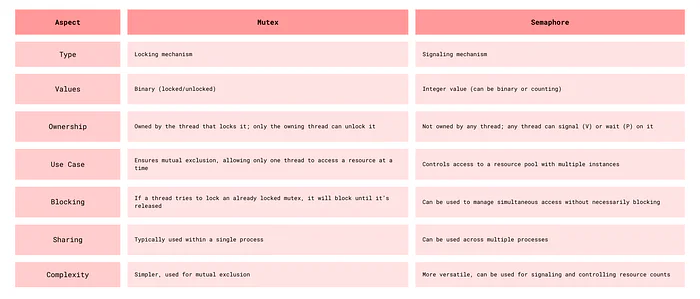
Producer Consumer Problem
The producer-consumer problem is a classic synchronization problem where two threads share a common buffer. The producer thread produces data and puts it into the buffer, while the consumer thread consumes the data from the buffer.
Requirements
- The producer should not produce data if the buffer is full.
- The consumer should not consume data if the buffer is empty.
- The producer and consumer should not access the buffer at the same time.
A possible solution
Using Mutex and Semaphore: Use a mutex to protect the buffer and two semaphores to signal when the buffer is full or empty.
// Shared variables
Semaphore full = 0;          // Counts filled slots
Semaphore empty = BUFFER_SIZE; // Counts empty slots
Mutex mutex;                 // Ensures mutual exclusion

Producer:
    while (true)
    {
        item = produce_item();
        wait(empty);          // Decrement empty count
        lock(mutex);          // Enter critical section
        add_item_to_buffer(item);
        unlock(mutex);        // Exit critical section
        signal(full);         // Increment full count
    }
Consumer:
    while (true)
    {
        wait(full);           // Decrement full count
        lock(mutex);          // Enter critical section
        item = remove_item_from_buffer();
        unlock(mutex);        // Exit critical section
        signal(empty);        // Increment empty count
        consume_item(item);
    }
Readers-Writers Problem
Problem where multiple threads read from a shared resource, while a single thread writes to it. The goal is to allow multiple readers to access the resource simultaneously, but only one writer can access it at a time.
A possible solution
- Readers Priority: Allow readers to access the resource if no writer is waiting, but block writers if there are readers.
- Writers Priority: Allow a writer to access the resource only if there are no readers or writers.
- Fairness: Ensure that readers and writers are treated fairly and that no thread starves.
// Shared variables
Semaphore mutex = 1;        // Protects read_count
Semaphore write_block = 1;  // Ensures mutual exclusion for writers
int read_count = 0;

Reader:
    wait(mutex);
    read_count++;
    if (read_count == 1)
        wait(write_block);    // First reader locks writer
    signal(mutex);
    read_data();
    wait(mutex);
    read_count--;
    if (read_count == 0)
        signal(write_block);  // Last reader releases writer
    signal(mutex);
Writer:
    wait(write_block);        // Ensure exclusive access
    write_data();             // Perform writing
    signal(write_block);      // Release exclusive access
Dining Philosophers Problem
Problem where a number of philosophers sit at a table with a bowl of spaghetti. Each philosopher needs two forks to eat, but there are only five forks on the table. The philosophers alternate between thinking and eating.
Requirements
- A philosopher can only eat if they have both forks.
- A philosopher must put down their forks after eating and allow others to use them.
- Deadlocks & Starvation must be avoided.
A possible solution
Resource Hierarchy: Assign a unique number to each fork and require that philosophers pick up the lower-numbered fork first.
For philosopher i (0 to N-1):
    while (true)
    {
        think();
        if (i % 2 == 0) {
            // Even-numbered philosopher
            pick_up_fork(i);              // Left fork
            pick_up_fork((i + 1) % N);    // Right fork
        } else {
            // Odd-numbered philosopher
            pick_up_fork((i + 1) % N);    // Right fork
            pick_up_fork(i);              // Left fork
        }
        eat();
        put_down_fork(i);                 // For left fork
        put_down_fork((i + 1) % N);       // For right fork
    }
Conditional Variables
They allow threads to wait for a certain condition to become true before proceeding. Mostly used with mutexes to manage access to shared data.
- Wait(): releases the associated lock and puts the thread into a waiting state. The thread reacquires the lock when it is notified.
- Notify(): wakes up one of the threads waiting on the conditional variable.
- NotifyAll(): wakes up all waiting threads.
Example of Condition Variables in Producer Consumer:
// Shared variables
Mutex mutex;
Condition not_full, not_empty;
Buffer buffer;

Producer:
    lock(mutex);
    while (buffer.is_full())
    {
        wait(not_full, mutex);  // Wait until buffer is not full
    }
    buffer.add(item);
    signal(not_empty);          // Signal that buffer is not empty
    unlock(mutex);
Consumer:
    lock(mutex);
    while (buffer.is_empty())
    {
        wait(not_empty, mutex); // Wait until buffer is not empty
    }
    item = buffer.remove();
    signal(not_full);           // Signal that buffer has space
    unlock(mutex);
    consume_item(item);
Conditional Locks — Locks used with conditional variables to protect shared data.
Spurious Wakeups — Occurs when a thread waiting on a condition variable wakes up without being notified or without the condition being true. To handle spurious wakeups, always check the condition after waking up. They are like the nightmares of synchronization!
Monitors
A high-level synchronization concept that combines a mutex, condition variable and the shared data into a single structure. They ensure that only one thread can access the shared data at a time and provide a way for threads to wait for a condition to become true.
MultiThreading patterns
Boss Worker pattern
General concept is where a boss thread assigns tasks to worker threads. The boss creates the worker thread and then manages too. Just like real life.
Used in loadbalancing or distributing tasks across threads.
bossThread:
    for (task in taskQueue)
    {
        worker = getAvailableWorker();
        worker.assignTask(task);
    }
workerThread:
    while (true)
    {
        task = waitForTask();
        processTask(task);
    }
Pipeline pattern
Data flows through a sequence of stages, each one handled by a thread. Each stage processes the data and passes it to the next stage. Used in data processing, compilers, image rendering, etc.
stage1Thread:
    while (true)
    {
        data = readData();
        sendToStage2(data);
    }
stage2Thread:
    while (true)
    {
        data = receiveFromStage1();
        processedData = process(data);
        sendToStage3(processedData);
    }
stage3Thread:
    while (true)
    {
        data = receiveFromStage2();
        writeData(data);
    }
Layered pattern
Organizes threads into layers, where each layer performs a specific function. Used in networking, operating systems, etc.
layer1Thread:
    while (true)
    {
        data = receiveData();
        process(data);
        sendData(data);
    }
layer2Thread:
    while (true)
    {
        data = receiveData();
        process(data);
        sendData(data);
    }
Storage Management
Introduction
Storage management in operating systems is a critical component that ensures efficient handling of data storage, providing fast access and retrieval when needed. This article explores two key aspects of storage management: disk scheduling algorithms that optimize how requests for disk access are processed, and buffer cache mechanisms that significantly speed up data access.
Disk Scheduling Algorithms
When multiple processes request disk access simultaneously, the operating system must decide the order in which to service these requests. The primary goal is to minimize seek time — the time taken by the disk arm to move to the requested track.
First-Come, First-Served (FCFS)
This is the simplest disk scheduling algorithm, processing requests in the exact order they arrive in the queue.
- Advantages: Simple implementation. Fair approach that prevents request starvation.
- Disadvantages: Often results in poor performance. High seek times when requests are scattered across the disk.
Illustrative Example:
Consider disk requests for tracks 98, 183, 37, 122, 14, 124, 65, 67, with the disk head starting at position 53.
53 → 98 (45)
98 → 183 (85)
183 → 37 (146)
37 → 122 (85)
122 → 14 (108)
14 → 124 (110)
124 → 65 (59)
65 → 67 (2)
Total Seek Time = 45 + 85 + 146 + 85 + 108 + 110 + 59 + 2 = 640
Shortest Seek Time First (SSTF)
SSTF prioritizes the request closest to the current head position, regardless of when it arrived.
- Advantages: Significantly reduces total seek time compared to FCFS.
- Disadvantages: Potential for starvation — requests far from the head might wait indefinitely if new requests keep arriving near the current position.
SCAN (Elevator Algorithm)
Named after how elevators operate, the disk head moves in one direction, servicing all requests in its path until reaching the end, then reverses direction.
- Advantages: Prevents starvation of requests. More efficient than both FCFS and SSTF in many scenarios.
- Disadvantages: Higher seek time compared to optimized variants like LOOK.
C-SCAN (Circular SCAN)
C-SCAN modifies the SCAN algorithm by treating the disk as a circular list. After reaching one end, the head jumps to the other end and continues in the same direction.
- Advantages: Provides more uniform wait times for all requests.
- Disadvantages: Creates unnecessary movement when jumping from one end to the other.
LOOK Algorithm
LOOK improves upon SCAN by only traveling as far as the last request in each direction, rather than going all the way to the physical end of the disk.
- Advantage: Reduces unnecessary head movement, improving efficiency.
C-LOOK Algorithm
Similar to C-SCAN, but the head only goes as far as the last request in each direction before jumping back.
- Advantage: More efficient than C-SCAN by eliminating unnecessary movements.
Buffer Cache and Disk Caching
A buffer cache is a portion of memory dedicated to storing frequently accessed disk data, significantly speeding up data retrieval operations.
How Buffer Caching Works
- When the system needs data, it first checks if the information is available in the cache.
- If found (a "cache hit"), the data is accessed quickly from memory.
- If not found (a "cache miss"), it retrieves the data from disk and stores a copy in the cache for future access.
Types of Disk Caching
- Write-Through Cache: Data is written simultaneously to both the cache and the disk. Provides data consistency but offers slower write performance.
- Write-Back Cache: Data is initially written only to the cache. Updates are later written to the disk during idle periods. Offers better performance but risks data loss during system failures.
That's it :)!